We know actions speak louder than words. But some simple, carefully-chosen words that lead to exemplary action can speak volumes, too. This is especially true for teachers.
Continue reading “5 Empowering Phrases for Elementary Teachers”

Curating resources & sharing stories to empower teacher & student ownership, wonder, and daring.

We know actions speak louder than words. But some simple, carefully-chosen words that lead to exemplary action can speak volumes, too. This is especially true for teachers.
Continue reading “5 Empowering Phrases for Elementary Teachers”

“Awareness is the greatest agent for change” (Eckhart Tolle). That’s why we’re contributing to the dialogue on gender differences in education.
Author and literacy advocate Pam Allyn has written several powerful articles that rally the public to recognize educational barriers to girls’ education across the globe, such as this one here, here, here, and here. She urges us to take action on terribly serious realities, including the fact that two-thirds of those who are illiterate are female. She has established “LitWorld’s girls’ LitClubs that meet around the world, sometimes in secret, to read together and write together” (“For These are All our Girls”). With all this action on behalf of girls, one might expect that Pam’s work is limited to that sex. But it’s not.
She has also written Best Books for Boys, in which she highlights several obstacles to boys’ reading, including the following: “the testing mania and the idea in our culture that learning is symbolized by children sitting quietly in their seats has been, in some cases, defeating for active boys” (p. 21). She regularly writes articles about all children, and the stories they have to share (such as this one, or this one). She even founded the Books for Boys literacy program.
There’s an important pattern here: one of recognition and action for all children. Those of us involved in children’s education must be willing to acknowledge that academic barriers exist for boys and girls alike.
Evidence of the unique educational challenges for both genders is mounting. We list a few points below.

Author Leonard Sax extensively researches gender differences, and has cited several ways female teachers might pay closer attention to the differing needs of their male students. One such difference lies in what’s more visually appealing to females than males. Says Sax:
“…boys are more likely to draw a scene of action, such as a monster attacking an alien; girls are more likely to draw people, pets, flowers, or trees, with lots of colors. The people in the girls’ pictures usually have faces, eyes, hair, and clothes; the people in the boys’ pictures (if there are any people) often are lacking hair, clothes, often the boys draw mere stick figures in one color. How come? The usual answer “Because that’s what we teach them to do” is unpersuasive, as I explain in Why Gender Matters. On the contrary, many of these boys insist on drawing these pictures not because teachers tell them to draw such pictures, but in spite of the teacher’s repeated pleas, “Why do you have to draw such violent pictures? Why can’t you draw something nice – like what Emily drew?” (source)
Another difference he discusses is hearing, even citing it as a possible contributing factor for the more frequent ADHD diagnoses for boys over girls. “…the average boy may need the teacher to speak more loudly–roughly 6 to 8 decibels more loudly–if the average boy is to hear the teacher as well as the average girl hears” (source). Teachers need to be aware of such differences to ensure they do not unintentionally favor their female students.
(For more on the ratio of male teachers to female teachers, check out our post, “Elementary teachers less than 25% male in US”).
As author William S. Wilson wrote:
“Comparisons deplete the actuality of the things compared.” (from “Conveyance: The Story I would Not Want Bill Wilson To Read”)
Articles like Bryce Covert’s “Enough Mansplaining the ‘Boy Crisis’ — Sexism Still Holds Back Women at Work,” offer criticism when concerns are raised for one gender, because they feel the other gender is more victimized. However, such comparisons undercut our collective efforts for children; we need “all hands on deck” in order to address the educational struggles facing all our youth. With objectivity and compassion, let us endeavor to understand and improve the state of education for children everywhere.
Featured Image Credit:

No one likes dedicating time to an unproductive, thankless task–especially if you’re a teacher maintaining a class blog that no one checks! Here are 10 of our time-tested strategies to improve your blog, and to encourage your students and parents to visit.
Some teachers see this word and want to run for the hills–after all, the list of educational strategies with this recommendation could probably stretch for miles. However, the good news is that this doesn’t have to be a time-intensive commitment when you employ one or more of the following tips:
Add a tag or two to each post to help students and parents easily navigate your archives. Be sure to remember to add the tag widget to your sidebar as well!

Students of every age love seeing their pictures, and parents love seeing their kids in action at school! The result: an effective way to draw in your audience. This is where your platform’s app may come in handy as well so you can post directly from the device with which you took pictures. Of course, you may find you’d prefer to microblog your pictures using Twitter, but you can always also add a Photo Gallery section to your blog for students to explore. For posts with pictures, remember to add a “pictures” tag!
Not only does this get students excited about the concept of blogging in general, but if you put links to each of their blogs on your homepage sidebar, they will have an added incentive to visit. Get started using our practical (and teacher-tested) guide to student blogging!
Creating a few drop-down menus of organized student and parent resources is a fantastic way to increase your blog’s usefulness and traffic! If you’re an elementary school teacher, you can make one page for each subject area that’s packed with links to relevant games and tools. However, be sure to screen every link, both for safety and for quality–even young students are tech-savvy enough to see through an arbitrary list of “games” that aren’t actually fun! Check out our list of student favorites!
It may take a few months before your class blog catches on with a regular traffic flow. Just keep looking for ways to make it as useful as possible for your students, soliciting their ideas to find out what resources would help them!
Ask yourself: do YOU enjoy looking at busy web pages with patterned wallpapers of dogs or bright bubbles that make the words difficult to discern? Keep the colors solid behind all words, and play with fonts, sizes, and text colors to ensure easy reading.
If you have a class Twitter account or hashtag, make sure you add a widget to your sidebar that projects that Twitter feed (see our post on unlocking Twitter’s classroom potential). Also, ask students whether they’d be interested in seeing RSS feeds from sources such as TIME’s picture of the week, NASA’s image of the day, daily science news, or even a daily comic strip.

In all the back-to-school paperwork, be sure to promote your class blog link as much as possible! Let parents know the link is in your email signature, and remind them as necessary throughout the year!
A fun way to encourage visitors is to periodically throw in an incentive. Give students a “Secret code word” in your post every now and then, telling them to write it on a slip of paper and to covertly hand it in the next day for a treat or bonus.
Photo Credit
niXerKG (featured image)

Whether you are looking for games to add to your class blog or to your class computer bookmarks menu, we have compiled ranked lists based on games most visited and praised by 5th graders over several years! All the games are free and kid tested. Be sure to check out other ways to improve your classroom blog here! (All links last checked for safety and functionality on July 29, 2016).

Class meetings are more than about discussing logistics or class management, although those are benefits, too. It’s about creating an environment where everyone can feel comfortable to speak their minds & learn from each other!
“Security is mostly a superstition. Life is either a daring adventure or nothing.” — Helen Keller
We all develop inhibitions through the years as we become fearful of failure. This kind of mentality, however, is absolutely stifling to any real learning. We must find authentic ways to show students we welcome risk-taking, rather than just telling them we do. Class meetings are a perfect way to do so! Because of their low-pressure settings, they have the capacity to help even the shyest students to slowly build their confidence over the year.
In the blur of lunch count, P.E., and grading, it’s easy to get caught up in the logistics of school, neglecting personal relationships. However, most of us began teaching because of people–as it should be! Class meetings provide an appropriate, dedicated environment for sharing personal experiences–ones of celebration, loss, anticipation, anxiety, and just plain silliness. Such sharing renews and strengthens our most important priority: the students with whom we work.
Listening, turn-taking, appropriate responding, articulating ideas–these are just a few social skills developed in a class meeting environment. As teachers, it’s easy to react to apparent deficits in these social skills during instruction time with consequences–but what students often need more is additional practice and examples of people effectively using these skills!

This benefit is best illustrated with an example from my classroom. On my first day back at school after a week-long illness-related absence, we gathered in our circle. Students quickly began to report that behavior was not always at its best with our substitute teachers, which led to one student volunteering the statement, “Some kids think, ‘Well, I’m not going to get anything for it, so why should I be good?’” This led to one of our most animated and earnest conversations of the year. As they explored and debated this question, the class eventually came up with the following thoughtful answers, among others:
No matter how smooth your classroom management or arrangement, the fact is, issues invariably arise each year with each group of students. From desk arrangements to concerns about homework loads, students will pick up on small details teachers overlook. When you give them the opportunity to voice concerns and then to discuss them as a class during regular meetings, the classroom starts to truly become a shared, democratic environment instead of one run by one imperfect person. While a class meeting should by no means be the only opportunity for student voice, it is one helpful medium!
No matter how old your students are, it’s essential to start by discussing expectations. To help them understand the shared nature of class meetings, make sure these are not your expectations, but what the class truly expects from one another during the meetings. Make a shared list, have students sign it as a contract, and post it in the class meeting area for a visual reminder. Have a couple of practice trials that emphasize the expectations, and model some of those skills by role-playing with students!
“Talking circles are more successful when the participants have trust with each other. Taking time to share stories, build relationships, explore values, and create guidelines for participation helps everyone feel physically, psychologically, and emotionally safe in the circle and creates a foundation for courageous acts of sharing.” (Winters, A.)
Have students start by sitting in a circle, and one-by-one, passing a “talking object” that declares that they have the floor for sharing. (My students have always loved using a Koosh ball for this purpose).
Place this box in an accessible location to give students the opportunity to share compliments for the positive acts they notice from classmates, or for suggestions to help the classroom run more smoothly. We recommend making and printing your slips to provide a template that includes lines for names, solutions, etc. Remember to model to students what quality compliments and suggestions look like (which will avoid excessive “You are nice” slips, or complaints without ideas for solutions)!
If it matters to your students, it should matter to you! Set aside a regular weekly time, even if it’s only 15-20 minutes. If assemblies or field trips shift the schedule, discuss with students whether they’d like to reschedule that week to help them know it’s still a priority!
During the Talking Circle, we suggest that you leave the sharing open-ended, rather than giving students a prompt. We also recommend that you give them the choice to “Pass” on their turn to keep it from becoming a stressful, pressured situation.
Photo Credit:
Britt-knee (featured image)
DoremiGirl
Sources:
Winters. A. https://www.heartland.edu/documents/idc/talkingCircleClassroom.pdf

If teachers want to truly prepare students for the future, we must accept that social media is not going anywhere. Read on for tips on getting started in Twitter as an educator!
“Isn’t Twitter just another mundane way to micro-share everything in your life?” “Twitter just seemed too complicated with all the symbols and rules.” “Even if there are educational resources on Twitter, I just don’t have the time to join another social media website.”
Do any of these thoughts sound like you? If so, you’ve come to the right place, because we’ve been there, too! This article is designed to help you understand its benefits as an educator, as well as to provide basic steps and ideas to get started–all from the perspective of a fellow educator!
We very purposefully place this reason first! Resources like Twitter are the reason professional development is increasingly becoming a personalized experience at schools. Once you establish yourself with few educational hashtags combined with tools such as TweetDeck (see Simple Steps below), you will instantly have a wealth of current topics and resources to explore. For example, check out the screenshot that I randomly took of my own Twitter feed below:

Just glancing at the feeds, you can see resources and conversations ranging from math fact apps, to tips for using QR codes, to ideas for supporting inquiry! Many professional development days at schools currently involve the entire staff listening (often halfheartedly, especially if it doesn’t apply to them individually) to a couple of admin-selected trainers. Envision PD instead becoming days when the staff breaks into groups to spend the day truly exploring their areas of professional interest/needs–reading/discussing articles and contacting experts online with questions. Twitter has the potential to revolutionize each teacher’s development as professionals not only on a school-wide basis, but on a personal basis as well!
“The Twitter shift puts each educator in control of her own professional development with self-direction and personalization of content at any time…during planning periods or outside of the school day…If I want, I can get a daily dose of professional learning to go with my early morning cup of Joe. Through the Twitter platform, I discover best practice, research, solutions and ideas delivered to me in 140 characters or fewer, for just in time learning.” ~Meg Ormiston [source]
The relevance with regards to using Twitter goes beyond just relating to our more tech-savvy students (although that can be quite significant as well)! It goes back to what we described in professional development above. Twitter is an incredible vehicle for teachers and other educational experts to quickly and effectively share their most innovative and valuable ideas. If we continue to “go it alone,” despite the ready availability of such a goldmine, we will quickly lose touch with the growing possibilities within our own field.
“Social Media is here to stay. Its form may change, and certainly the applications we use will not remain the same, but the idea of openly exchanging information in whatever forms it is produced is not going away. As educators we can use it or lose it. If we don’t start to understand and use this technology soon, we will lose the opportunity to harness it, because we will be irrelevant. We don’t need social media to teach, as much as we need it to learn.” ~Tom Whitby [source]
As long as our discussions regarding current events and issues throughout the world remain within the confines of our own classroom, such ideas will continue to seem remote to students. Once we use Twitter to communicate with individuals actually involved in those issues and/or living in those places, students will begin to see themselves as real participants in a global community.
“Educators who participate in Twitter networks are well placed to support students in the use of relevant digital technologies because the Twitter community shares knowledge, resources and expert advice.” ~Tania Sheko [source]
Resources like Twitter provide educators with heretofore unheard of levels of genuine, global collaboration. We are perfectly poised now to share what works and what doesn’t, to seek and receive feedback when we’re stuck, and to showcase examples of great student learning. This last ability in particular can create increased community connectedness as parents truly witness and participate in their children’s learning. Classroom learning today looks drastically different than it did a generation ago–it calls for increased focus on process over product, on problem solving skills over memorized facts, and on student ownership over teacher control (see more ways learning has changed). Parents, administrators, and fellow teachers need to see the benefits of such changes in order to cultivate understanding and support; in other words, we need transparency across the board to further improve teaching and learning practices!
“…they started with the why, and then created a vision for sharing beyond the walls of the classroom. Their purpose was to share with the community the great things happening in classrooms in the three-building prek-8 school district.” ~Meg Ormiston [source]
Wait, did we say that already? Yep. It’s that important.
“Imagine if every teacher shared just one of their best sources with other educators, who in turn could tweet them out to the tune of 700,000 tweets in a half hour. Everyone would benefit. The idea here is to get educators familiar with the concept of connectedness and its possibilities…” ~Tom Whitby [source]
Twitter is less simplistic than other social media platforms when it comes to maximizing its use, especially in a professional capacity. However, it is well worth the time invested in establishing your own Professional Learning Network (PLN–check out our article on building PLN’s here). We have included some simple steps below to help you get started! Also, be sure to check out the 13-page Handbook from plpnetwork.com, which breaks down definitions and steps in easy-to-follow detail.
 Set-up a username using the @ symbol (called your Twitter handle)
If you teach at a BYOD school (Bring Your Own Device) or in another circumstance in which mobile devices are 1:1, the ways for students to use Twitter in the classroom are broader. Below are some specific ideas.
On the other hand, if your students are very young, if your school does not use BYOD, or if, for any other reason, you are the only person with access to Twitter in the classroom, there are still incredible and practical ways for you to use it!
Happy Tweeting! We’d love to hear your success stories in the comments!
Featured Image: Scott Beale / Laughing Squid
Sources:

BYOD or “Bring Your Own Device” is becoming more commonplace in workplaces and conferences, but what about in the classroom?
Since many students possess one kind of device or another (laptops, tablets, smartphones, etc.), implementing a BYOD approach at school has the potential to address the financial concerns of funding and maintaining school-wide technology. However, according to an article¹ by Sharo Dickerson, several essential considerations must be made before implementing such an approach:
Even when all the above procedural concerns are managed, introducing BYOD could quickly go the way of 1:1 laptop programs without care. According to a recent study¹, “Computers in K-12 classrooms are mostly used to support the same textbooks, curriculum, and teaching practices that continue to represent traditional classroom settings” (Norris & Soloway, 2011). Many administrators and teachers, such as Jennie Magiera², experience the pitfalls of assuming that just the presence of technology in the classroom will motivate and inspire learning to higher levels. During one of my student teaching experiences, I witnessed first-hand a classroom that was packed with all the latest technology, including 1:1 student desktop computers, an interactive whiteboard, and Activotes–yet it still felt the same as most traditional 20th Century classrooms. Even the high-tech interactive whiteboard was used like a regular whiteboard or, at best, a projector, with ordinary lists of math problems on the board to be solved, or Basal passages for students to read together.
So what do we do to help BYOD avoid the smoke and mirrors of other failed techno-integration attempts? According to the Dickerson article, it’s essential to include an “adaptation of constructivism in redesigning curriculum and content delivery.” In other words:
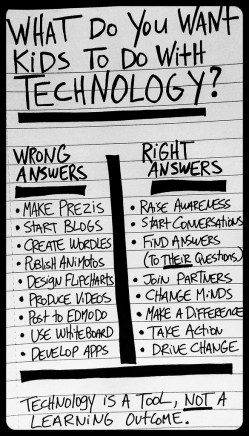
The common denominator in all these examples of higher level learning with technology? Technology has the potential to dramatically revolutionize 21st century learning; we can’t expect that to happen with same-old 20th century teaching strategies and mentalities!
As you implement a BYOD or any technology approach in your classroom, you will need to consider the unique needs of your students. However, we hope this list will give you some ideas to help students authentically use devices to enhance and customize their own learning:
1. Twitter (Click here for our article on Twitter for Teachers!)
Make a unique hashtag for your class that will enable you to post questions, comments, links, or even just regular announcements. Students could also upload thoughts on their learning using this hashtag, both in and out of the classroom! You can even use the hashtag to organize TweetChats during class for students to experience a dynamic debate that eliminates the need to “take turns talking.” (Tweetdeck is a great resource to easily view all Tweets within a hashtag). In addition, you could use existing hashtags such as #comments4kids to publish student work and ask questions to engage with a real audience! (See this free Twitter handbook for teachers for more ideas for classroom use, as well as information to get you started if you’re a Twitter newcomer!)
2. Skype
In the classroom, Skype is a close relative to Twitter in that both have the potential to truly take learning beyond your 4 walls! Check out our article that goes over how Skype Virtual Field trips work for some specific ideas!
3. App Selection
To help students really utilize technology as a learning tool, choose apps that are “Creation-based over Content-based!” My article on Practical Student Blogging also lists several resources that include creation-based apps, with Educreations being one of my favorites! Also see apps sorted by topic in my Edutopia post, “Visualizing 21st-Century Classroom Design.”
4. Differentiated Learning
Do you have students who have an IEP accommodation to have a scribe during writing? Help them discover and use speech-to-text apps such as Dragon Dictation or Evernote, or Google Apps add-ons like Text to Speech with Google Drive! Do you have students who struggle with remembering assignments or time management? Help them learn to manage their time with apps like Due or again, Evernote. Meeting every student’s diverse needs can go from being an elusive ideal to a truly attainable undertaking when we “use technology creatively” (WhatEdSaid article) in the classroom!
5. Student Blogging
Have students keep digital portfolios of their work and progress throughout the year using blogs! Check out our post on student blogging for specific ideas to get you started. 2016 edit: Also be sure to check out Seesaw & our privacy-friendly alternatives to blogging.
6. Google Collaboration
Turn writing assignments and other projects into more effective collaboration as students work together in real time in Google Drive! With their work already online in highly shareable files, they can seek for feedback not just from their classmates, but other peers around the school or even the globe! We feel strongly that this kind of technology use will empower kids with authentic problem-solving skills as they learn how and from where to seek real feedback (ie, not just their teacher)!
7. Presentations
Thanks to technology, the mediums for presentations have stretched well beyond dioramas, posters, and essays. Perhaps students will want to make a Toontastic puppet show on their iPad. Others may want to create a Youtube video instead. Still others may opt for a Prezi (see our post on replacing Powerpoint with 3 highly collaborative, interactive resources). Whatever the case, with so many options at their fingertips, be sure to give students more autonomy in constructing and displaying their thinking with their BYOD devices!
8. Enrich the scientific process
From digital microscope apps to the simple camera features of devices, students can take scientific learning to a new level. For example, you can have students take daily photos of an experiment’s progress to create time lapse videos (idea from this WhatEdSaid article), which would help them analyze their data in new ways! Additionally, students can use Twitter and Skype to ask for feedback from experts or other classes around the world on their findings, or simply to communicate their results!.
9. QR codes
Turning any device into a barcode reader/creator is easy with QR codes! As you consider the many suggestions available online for their classroom use, remember to hunt for ideas that give students opportunities for ownership and connection–in other words, be picky! One idea we found that could help fit this purpose include printing and posting some codes around the classroom that take students to various photos or videos to provoke their thinking at the beginning of a unit. Another idea involves students making QR codes for their research findings that they then post together in the classroom or virtually on the class blog! Be sure to ask for student input for their use in class as well!
10. Revolutionize Exit Tickets
Rather than sort through exit tickets or assignments after students have gone home with misconceptions, check their progress during learning activities and projects using the program, Exit ticket! Because you can see their understanding right away, you can adjust your approach to better address their needs. The program is available on virtually any device with access to a network, thanks to compatibility with Android, iOS, and desktops.
Photo Credit:
Sources:
4 Various WhatEdSaid articles